

Predictive booking
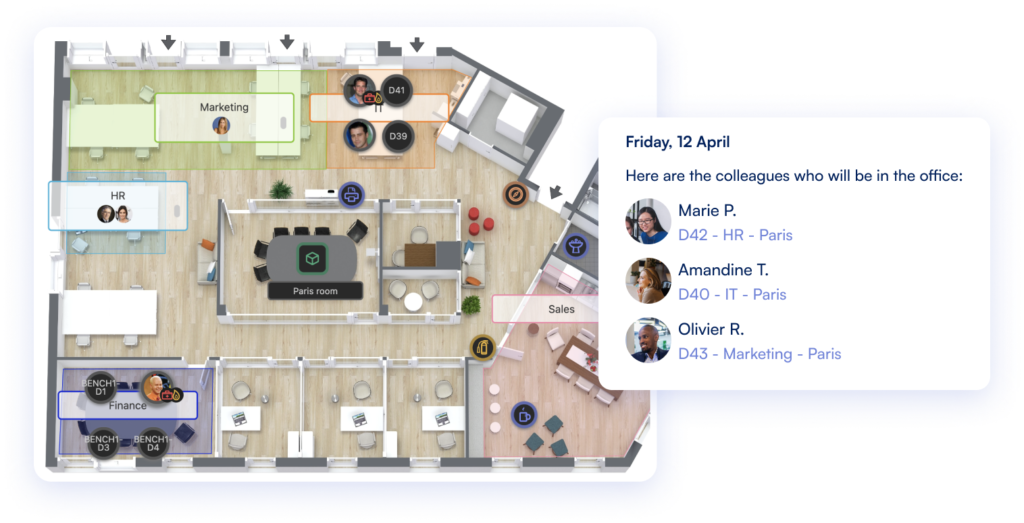
Waldo learns your rhythm and reserves your desk automatically. Or pick a specific desk on the interactive floor plan: capacity is guaranteed, with no overbooking.


Free flex office app for Microsoft Teams
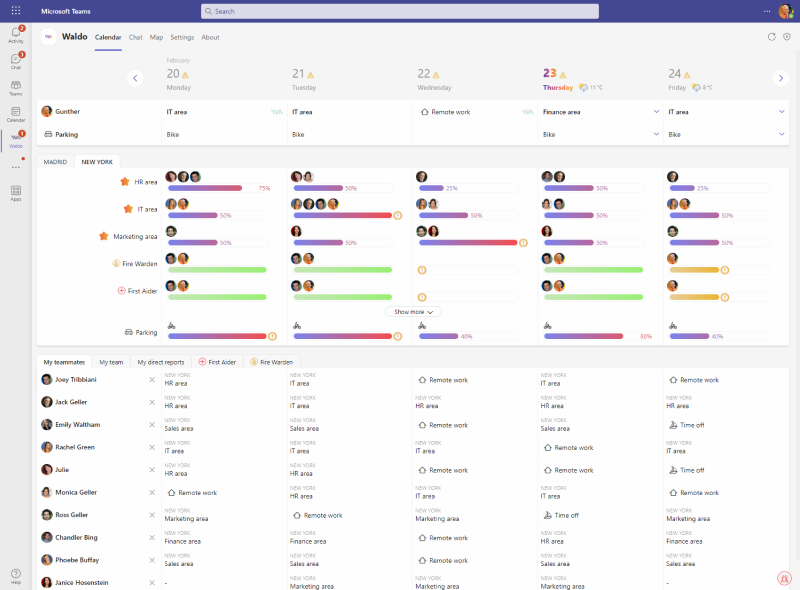
Waldo's free version is completely free: no time limit, no user limit. Each employee declares where they work (at the office, remote or absent), and everyone sees who's coming and how full the office is. When you want a guaranteed desk for everyone, switch to the complete version of our desk booking app.
0 € forever · No time or user limit · Deployed like any Teams app
Real estate, IT and HR teams in 350+ companies use Waldo








In the free version
Everything you need to coordinate office days, at no cost.
Whether you look after real estate, IT or HR, this free hybrid work software gives your teams a clear view of the office and of each other, right where they already work.
It works as a presence declaration: no specific desk is booked, so more people can declare "office" than there are desks. Need a guaranteed seat for everyone? That's the complete version.
Getting started
Install Waldo from Microsoft AppSource or the Teams app store. Or your IT team deploys it to everyone with Teams policies, with nothing to install on devices.
Waldo analyses your recent interactions to identify your closest teammates. You are on board in no time.
Declare where you will work, check office occupancy, see where your teammates will be and choose the best days to come in.
Complete version
The complete version ends overbooking: everyone books a real desk on the interactive floor plan, plus parking and meeting rooms, with every tool to keep it fair, for 30 € per user per year.
Waldo learns your rhythm and reserves your desk automatically. Or pick a specific desk on the interactive floor plan: capacity is guaranteed, with no overbooking.
Car, electric vehicle, motorbike or on foot: Waldo makes sure a spot is ready when you arrive, and finds an alternative if someone took yours.
Reply "yes" to "Have you arrived at the office?" in Teams. Check-in can also be geolocated, or replaced by your badge system.
Send us sketches and photos: we model your plans in 2D+, with your floor, wall and chair colours. Changes after a move are included at no extra cost.
Fully booked? Users join a waitlist, priority users get first access, and Waldo contacts people likely to cancel.
Book desks and spots for clients or partners. Admins keep a pool of spaces for guests, last-minute bookings and exceptions.
Book meeting rooms directly on the interactive floor plan, without leaving Microsoft Teams.
Team days and maximum home or office days, with a simple warning or a blocking rule.
Fully customised reports, built by you or by our team.
Yes. The free version costs 0 € forever, with no time limit and no limit on the number of users. You only pay if you choose the complete version, at 30 € per user per year.
No. The free version is a presence declaration: each employee says whether they work at the office, remotely or are absent, and sees who's coming and how full the office and car park are. No specific desk is booked, so overbooking is possible. Booking a desk, a parking space or a meeting room on the floor plan, with guaranteed capacity, comes with the complete version. See the full comparison on our pricing page.
Add Waldo from Microsoft AppSource or the Microsoft Teams app store. Your IT team can also deploy it for all users with Teams policies, with no app to install on devices.
No. Waldo uses Microsoft 365 single sign-on and your existing Microsoft 365 groups, so there is no data to synchronise and nothing new to manage.
Yes. Start with the free version and move to the complete version whenever you want a guaranteed desk for everyone, plus parking and meeting room booking. Book a demo and we will walk you through it.
Add Waldo to Microsoft Teams in minutes, or let us show you the complete version.