
Interactive tour
Take a tour of Waldo in Teams
Here is a quick overview of Waldo, the desk booking app for Microsoft Teams. Click the numbered icons on the screen below to see how Waldo books your desk and parking space, and shows you who's at the office.

Click the icons to explore Waldo
Seven things you can do with Waldo, right inside Microsoft Teams.
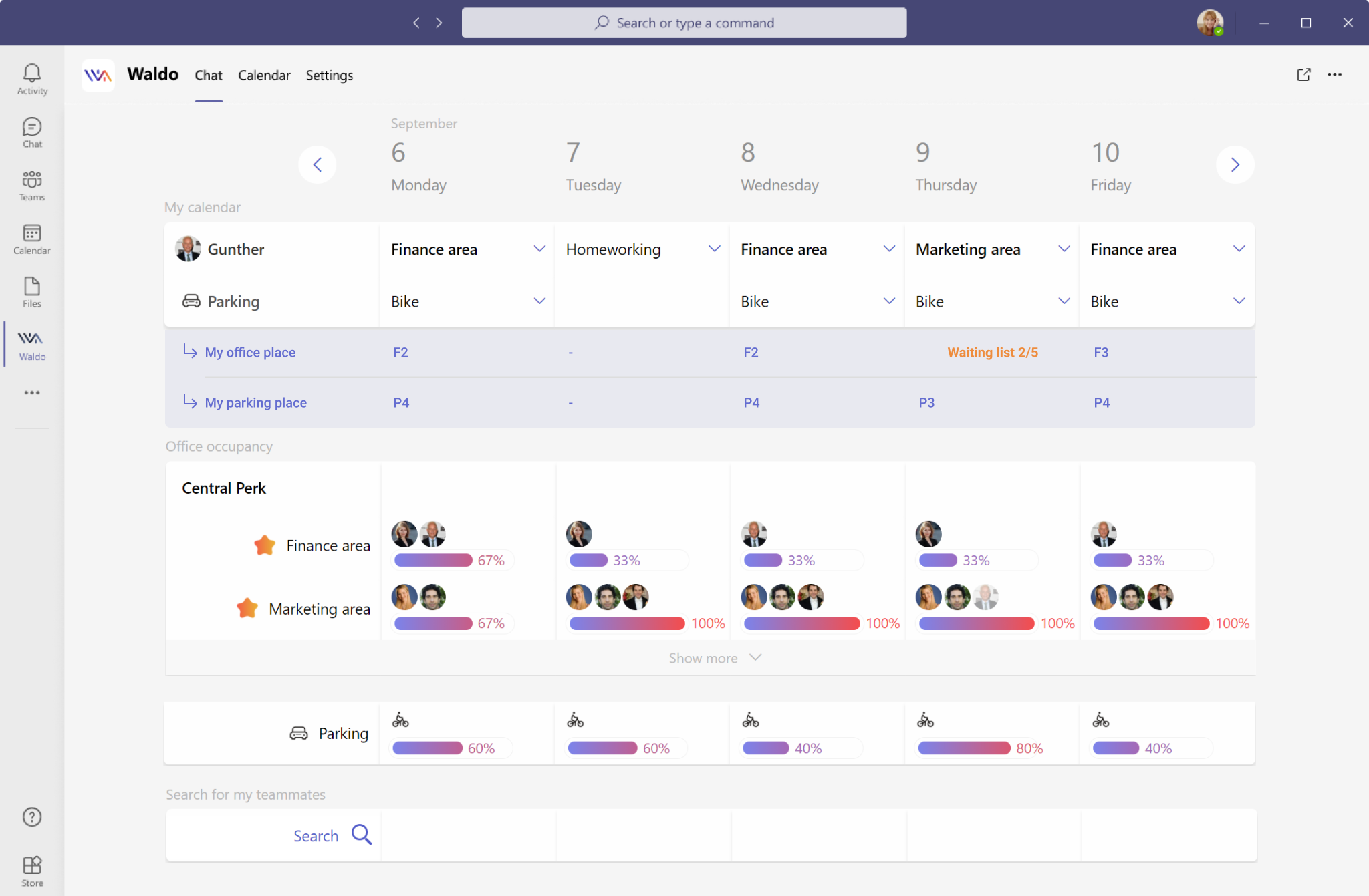
Tell Waldo where you usually work. Waldo then learns your habits and plans next week for you automatically.
Need a parking spot? Just pick one from the list. You can also choose the type of spot: electric, two-wheel or reduced mobility.
When the office is full, you may be placed on a waiting list, depending on your company's settings. If someone cancels, their spot goes to the next person in line.
Based on where you work, Waldo reserves a desk and a parking spot for you. You can see your desk number and parking space one week in advance.
See which teammates will be at the office, and how full the office is.
Use the search button to see who works where.
Chat with Waldo at any time, for example to ask it to book a specific desk.
- Your work week — Tell Waldo where you usually work. Waldo then learns your habits and plans next week for you automatically.
- Parking — Need a parking spot? Just pick one from the list. You can also choose the type of spot: electric, two-wheel or reduced mobility.
- Waiting list — When the office is full, you may be placed on a waiting list, depending on your company's settings. If someone cancels, their spot goes to the next person in line.
- Desk and parking reserved — Based on where you work, Waldo reserves a desk and a parking spot for you. You can see your desk number and parking space one week in advance.
- Teammates and occupancy — See which teammates will be at the office, and how full the office is.
- Search — Use the search button to see who works where.
- Chat with Waldo — Chat with Waldo at any time, for example to ask it to book a specific desk.
Prefer to watch? The very short demo
See Waldo in action in less than a minute.
Want more? Browse all our demo videos or the step-by-step demo and training center.
Interactive tour: frequently asked questions
Is the tour the real Waldo interface?
Yes, the tour is based on a screenshot of the real Waldo screen in Microsoft Teams. Each numbered icon explains one feature; it's a static image, so you can't book from it. To use Waldo for real, add the free version to Teams.
How can I try Waldo for real?
Add the free version to Microsoft Teams from Microsoft AppSource: it takes about two minutes and is free forever. Your teams can declare office, remote or absent and see who's coming. Specific desk, parking and meeting room booking come with the complete version, at 30 € per user per year. Compare plans.
Can I get a demo of Waldo with my own offices?
Yes, book a 45-minute live demo with our team by picking a slot in our calendar. We show you the complete version with your own use case and answer your questions. Book a demo.
Does Waldo work on mobile?
Yes, Waldo works in the Microsoft Teams mobile app on iOS and Android, as well as on Teams desktop and web. Since it runs inside Teams, there's no extra app to install or account to create. Learn more about desk booking.
Ready to see it with your offices?
Book a personalised demo with our team, or add the free version to Microsoft Teams today.