Microsoft Places vs Waldo: the complete comparison
Microsoft Places or Waldo? Licensing, pricing, desk and parking booking, APIs and Microsoft 365 integration compared side by side.

Product
Many companies still use a shared Excel file to decide who comes to the office and when. Waldo replaces it with WFH policies and occupancy limits that apply automatically in Microsoft Teams.

We see a lot of companies using work-from-home (WFH) Excel spreadsheets to make sure the office doesn't get too crowded. The idea started as a practical answer to the COVID-19 health constraints, and many teams kept it for their hybrid office.
The trouble is that a spreadsheet only works if everyone fills it in, keeps it up to date and checks it before coming in. Nobody enforces the rules, and the office manager ends up chasing people.
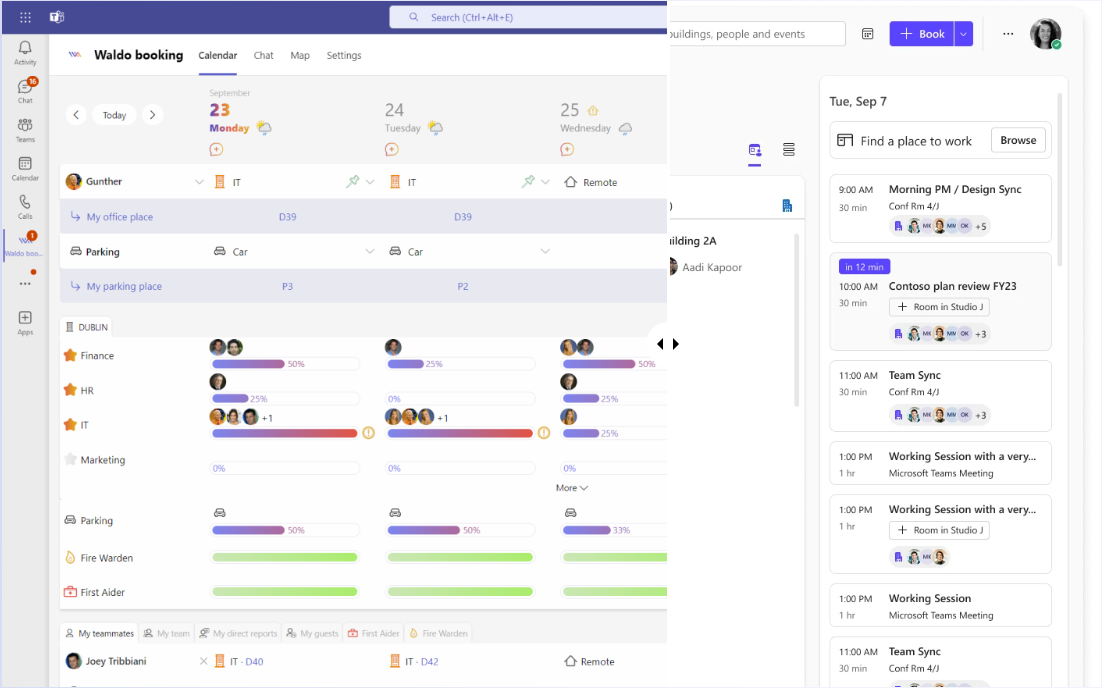
With the complete version of Waldo, you can set a maximum number of days at the office or a maximum occupation per area. The rules apply automatically when people book in Microsoft Teams, so this hybrid work software can retire your spreadsheet. Even the free version replaces the "who's coming?" tab: each employee declares in Teams whether they work at the office, remotely or are absent.
Watch the 15-second video on Vimeo.
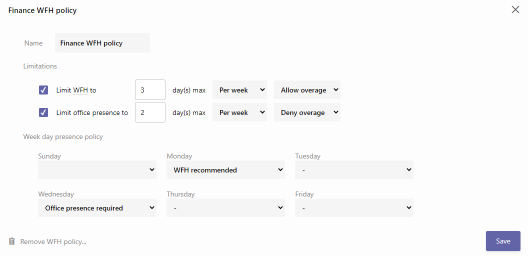
Define how many days people work from home and at the office. For example: three days at home and one day at the office, every Wednesday.
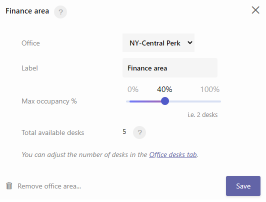
Cap occupancy for the whole office or for a specific area. For example: 50% maximum for the office, or 40% for a specific floor or zone.
| WFH spreadsheet | Waldo | |
|---|---|---|
| Office day rules | Written in a tab, not enforced | Applied automatically at booking |
| Occupancy limit | Manual counting | Maximum per office or per area |
| Where employees book | A shared file | Microsoft Teams chat, desktop or mobile |
| Full office | First to edit the file wins | Waiting lists with fair priority |
Once the policies are in place, Waldo, flex office software built for Microsoft Teams, does the rest: it learns habits to book desks ahead of time, manages waiting lists and handles parking spaces too. Start with the free version, or book a demo to set up your own rules with our team.
Yes. Waldo lets you set work-from-home policies and a maximum occupation per area, and applies them automatically when employees book a desk in Microsoft Teams.
No. The maximum number of office days and the maximum occupation per area come with the complete version. The free version lets each employee declare whether they work at the office, remotely or are absent, so everyone sees who's coming.
Yes. You can set a limit for the whole office, for example 50%, and a different one for a specific area, for example 40%.
Waldo's free version is free forever. The complete version costs 30 € per user per year. See pricing.
Microsoft Places or Waldo? Licensing, pricing, desk and parking booking, APIs and Microsoft 365 integration compared side by side.

Discover in a few minutes how Waldo makes your office truly flexible, right inside Microsoft Teams.

Most companies have nothing in place to manage parking. Here is how Waldo books spaces in Microsoft Teams and finds a backup when yours is taken.
Get a personalised 45-minute demo, or install the free version in Microsoft Teams in two minutes.